Search Engine Saturation: How Many of Your Pages Are Actually Indexed?
Table of Contents
- Key takeaways
- What is search engine saturation?
- How Search Engine Saturation works
- 1. Choose your website
- 2. Let it check automatically
- 3. Compare periods in Historical Analysis
- 4. Review daily saturation reports
- 5. Check any website instantly
- What to check first
- Search Engine Saturation vs. other My PR Manager tools
- Who Search Engine Saturation is for
- Frequently asked questions
- How is the indexed page count measured?
- Why are my Google and Bing numbers different?
- What should I do if my indexed pages drop?
- Can I check a competitor's indexed pages?
- How can I get new pages indexed faster?
- Start tracking your indexed pages
Before a page can rank, a search engine has to find it, crawl it and add it to its index. If that doesn't happen, the page is invisible in search, no matter how good the content is. Most website owners have no idea how many of their pages are actually indexed, and only notice a problem when traffic starts to fall. Search Engine Saturation in My PR Manager tracks how many of your pages Google and Bing have indexed, records that number over time, and shows you straight away if it starts to drop. You can also check any website, including your competitors', in seconds.
Key takeaways
- See how many of your website's pages Google and Bing have indexed.
- Track indexed page counts automatically and see the change from one check to the next.
- Compare periods from 1 week to 1 year in Historical Analysis.
- Click through from a report to the search results behind each number.
- Check several websites at once, including competitors, with Quick Saturation Checker.
What is search engine saturation?
Search engine saturation is the number of pages from your website that a search engine has in its index. It's usually measured with a site: search, such as site:yourwebsite.com, which returns the pages a search engine knows about for that domain.
The number itself is an estimate, but the trend is very useful. A steady rise usually means search engines are discovering your new content. A sudden fall is often the first sign of a technical problem, such as a robots.txt change, a noindex tag added by mistake, a broken sitemap or server errors, long before it shows up in your traffic.
How Search Engine Saturation works
1. Choose your website
Search Engine Saturation works with the websites in your My PR Manager account. Select a website in any of the reports to see its indexed page counts.
2. Let it check automatically
Indexed page counts for Google and Bing are checked automatically on a schedule, so a history builds up without any manual work.
3. Compare periods in Historical Analysis
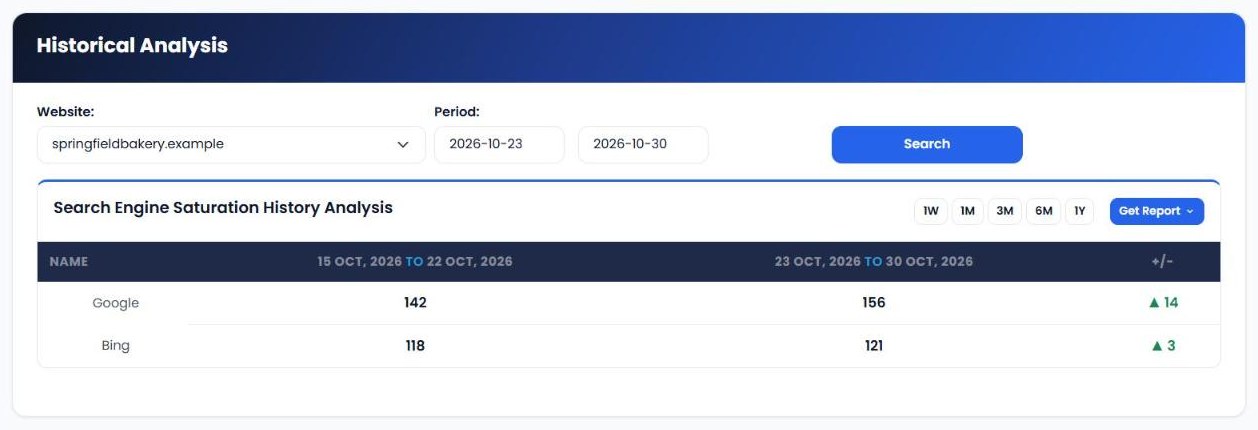
Historical Analysis compares the number of indexed pages on Google and Bing between two periods. Choose 1W, 1M, 3M, 6M or 1Y, or set your own dates, and the change column shows whether coverage is growing or shrinking.
4. Review daily saturation reports
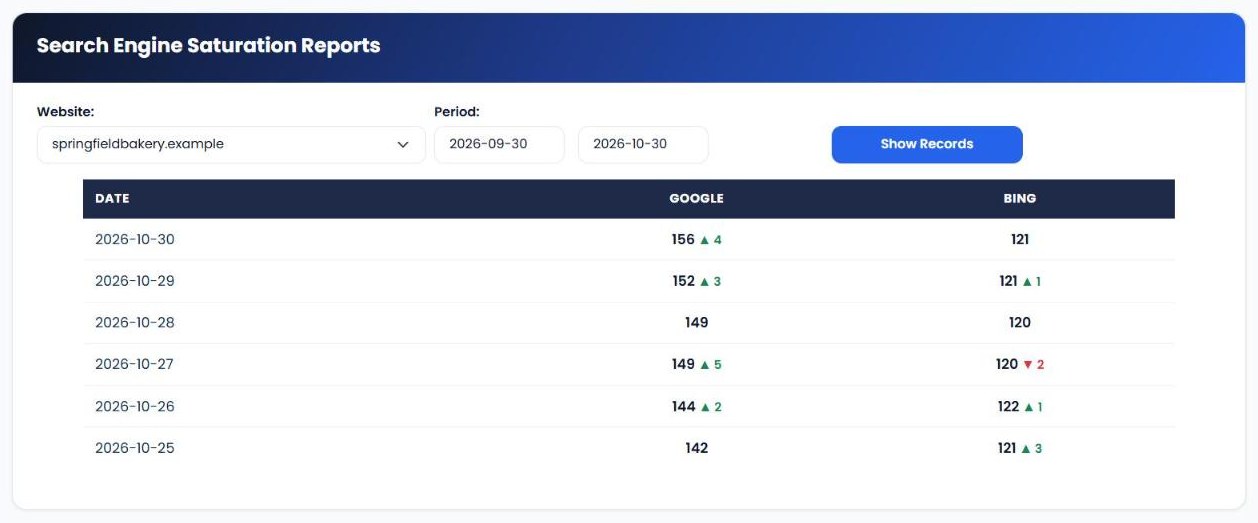
Saturation Reports list each check by date, with the number of indexed pages on Google and Bing and the change since the previous check. Each number links to the matching search results, so you can see which pages are indexed. Graphical Reports show the same history as a chart.
5. Check any website instantly
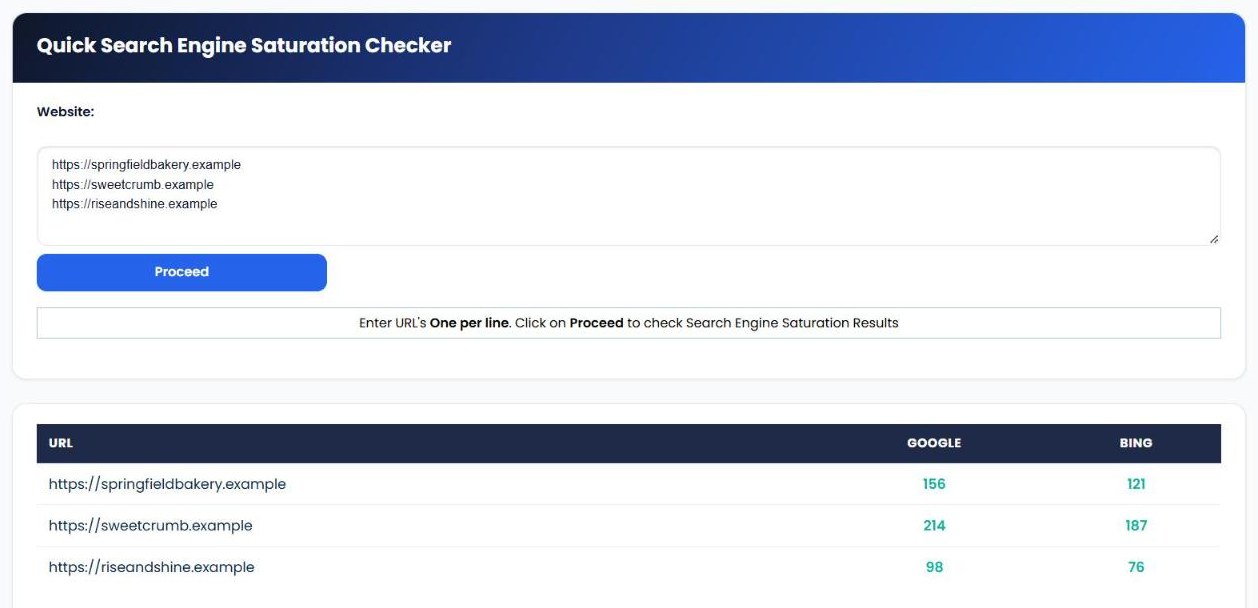
Quick Saturation Checker lets you enter several URLs, one per line, and see their indexed page counts on Google and Bing straight away. It's a fast way to compare your site with competitors, or to check a website before you work with it.
| Report | What it shows |
|---|---|
| Historical Analysis | Indexed pages on Google and Bing in two periods, with the change. |
| Saturation Reports | Indexed pages by date, with the change from the previous check and links to the search results. |
| Graphical Reports | A chart of indexed pages over time. |
| Quick Saturation Checker | Instant indexed page counts for any list of URLs. |
What to check first
- Sudden drops. If indexed pages fall sharply, check robots.txt, noindex tags, your sitemap and server errors straight away.
- Indexed pages vs. real pages. Compare the count with the number of pages you actually want indexed. Far fewer suggests discovery problems; far more can mean duplicate or low-value pages are being indexed.
- Google vs. Bing. A big gap between the two can point to a crawling issue with one search engine, or a sitemap that hasn't been submitted to both.
- Growth after new content. When you publish new pages, the count should rise over the following days or weeks. If it doesn't, the new pages may not be getting discovered.
- Competitors. Use Quick Saturation Checker to see how your indexed page count compares with competitors.
Search Engine Saturation vs. other My PR Manager tools
| Tool | Main job | Use it when |
|---|---|---|
| Search Engine Saturation | Track how many of your pages are indexed on Google and Bing. | You want to spot indexing problems early. |
| Page URL Indexer | Ask search engines to discover new or updated pages faster. | Pages aren't being indexed quickly enough. |
| Webmaster Tools | Show Search Console clicks, impressions and sitemap status. | You want Google's own data on performance and sitemaps. |
| Page Rank Tracker | Track Domain Authority and Spam Score over time. | You want to measure your site's overall strength. |
Who Search Engine Saturation is for
- Website owners who want early warning when something stops their pages appearing in search.
- SEO consultants and agencies who monitor technical health for clients.
- Bloggers and publishers who add new content regularly and want to know it's being indexed.
- Developers who want to confirm a site migration or redesign hasn't caused indexing problems.
Frequently asked questions
How is the indexed page count measured?
It's based on a site: search on each search engine, which returns the number of pages the engine reports for your domain. Treat it as an estimate and focus on the trend.
Why are my Google and Bing numbers different?
Each search engine crawls and indexes independently, so the counts are rarely the same. A very large gap is worth investigating.
What should I do if my indexed pages drop?
Check robots.txt, look for noindex tags, make sure your sitemap is working and check for server errors. Webmaster Tools can show sitemap errors reported by Google.
Can I check a competitor's indexed pages?
Yes. Enter any URL in Quick Saturation Checker, one per line, to see indexed page counts for several sites at once.
How can I get new pages indexed faster?
Make sure they're in your sitemap and linked from other pages on your site, and use Page URL Indexer to notify search engines.
Start tracking your indexed pages
If search engines can't see your pages, nobody else will either. Sign in to My PR Manager, open Search Engine Saturation, and find out how many of your pages Google and Bing have indexed today.
Related guides: Page URL Indexer · Webmaster Tools · Page Rank Tracker · Competitors Tracker